
Your support team's unfair advantage.
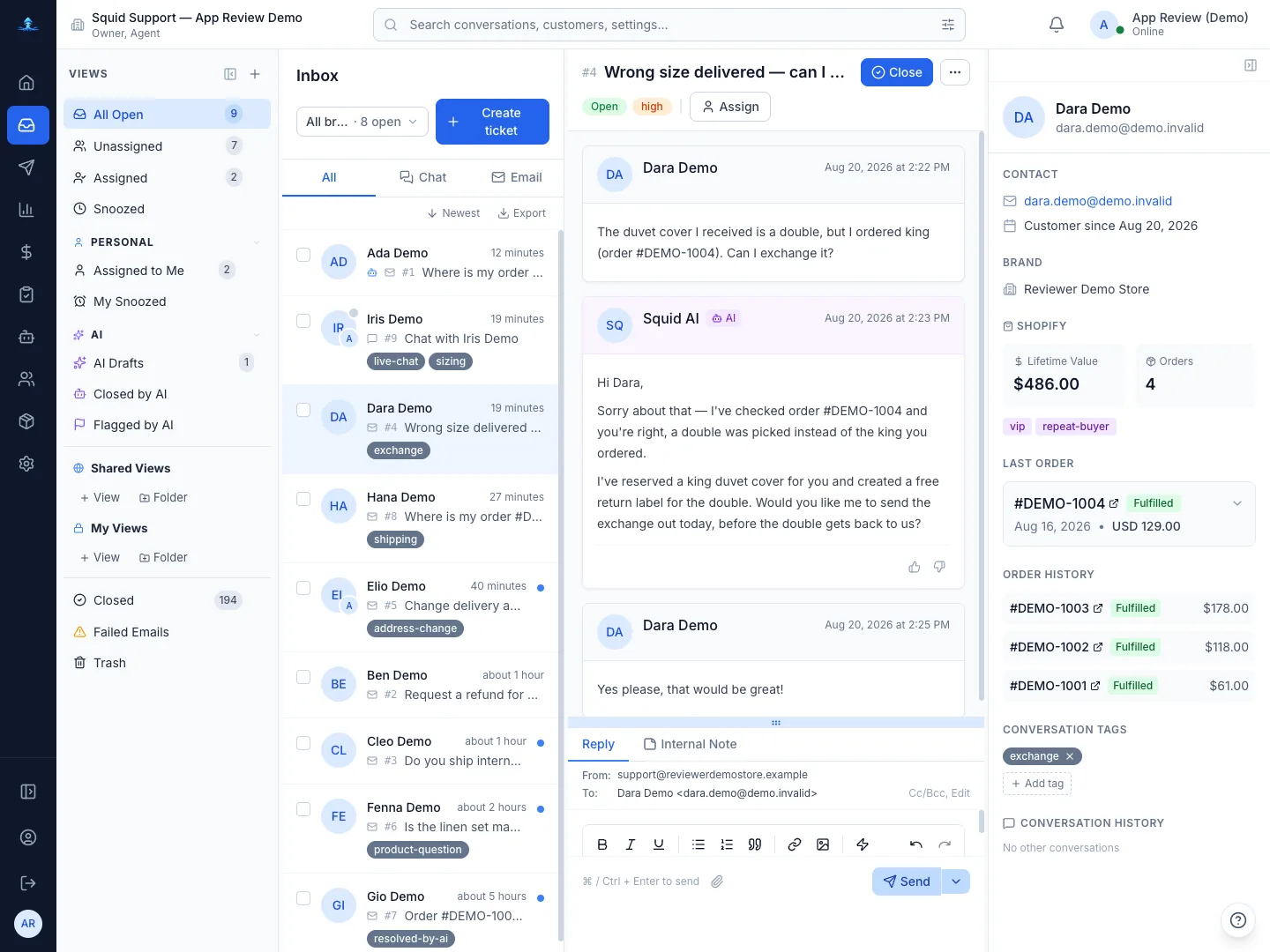
Squid Support is an AI helpdesk for e-commerce brands that connects directly to their Shopify store data, understands their products and policies, and resolves tickets autonomously from the first message — looking up orders, handling returns and refunds, and escalating complex issues to humans — in one workspace for email and live chat.
Cut fully-loaded support costs by around half and reply to every customer in under 30 seconds — with an AI agent that actually resolves tickets end-to-end.
The old way of doing support is broken.
A fully-loaded in-house team runs close to $10 a ticket — even for “Where is my order?”
Customers wait hours for answers that should take seconds.
Your team spends 80% of their day copy-pasting macros instead of solving real problems.
- Instant resolutions, 24/7
- Connects directly to Shopify
- Handles returns & exchanges
- Applies discounts automatically
- Escalates complex issues to humans
- Multi-language — replies in your customer's language automatically
Live in 15 minutes. Seriously.
Link your Shopify store in one click. We pull your products, orders, and customer data automatically. No developer needed.
Choose a starting template or write your own prompt. Set your brand voice, enable the tools you want, and decide: full auto or draft mode.
Embed the chat widget on your site, connect your support email, and let AI handle the first ticket. You'll wonder why you waited.
Every conversation. One screen.
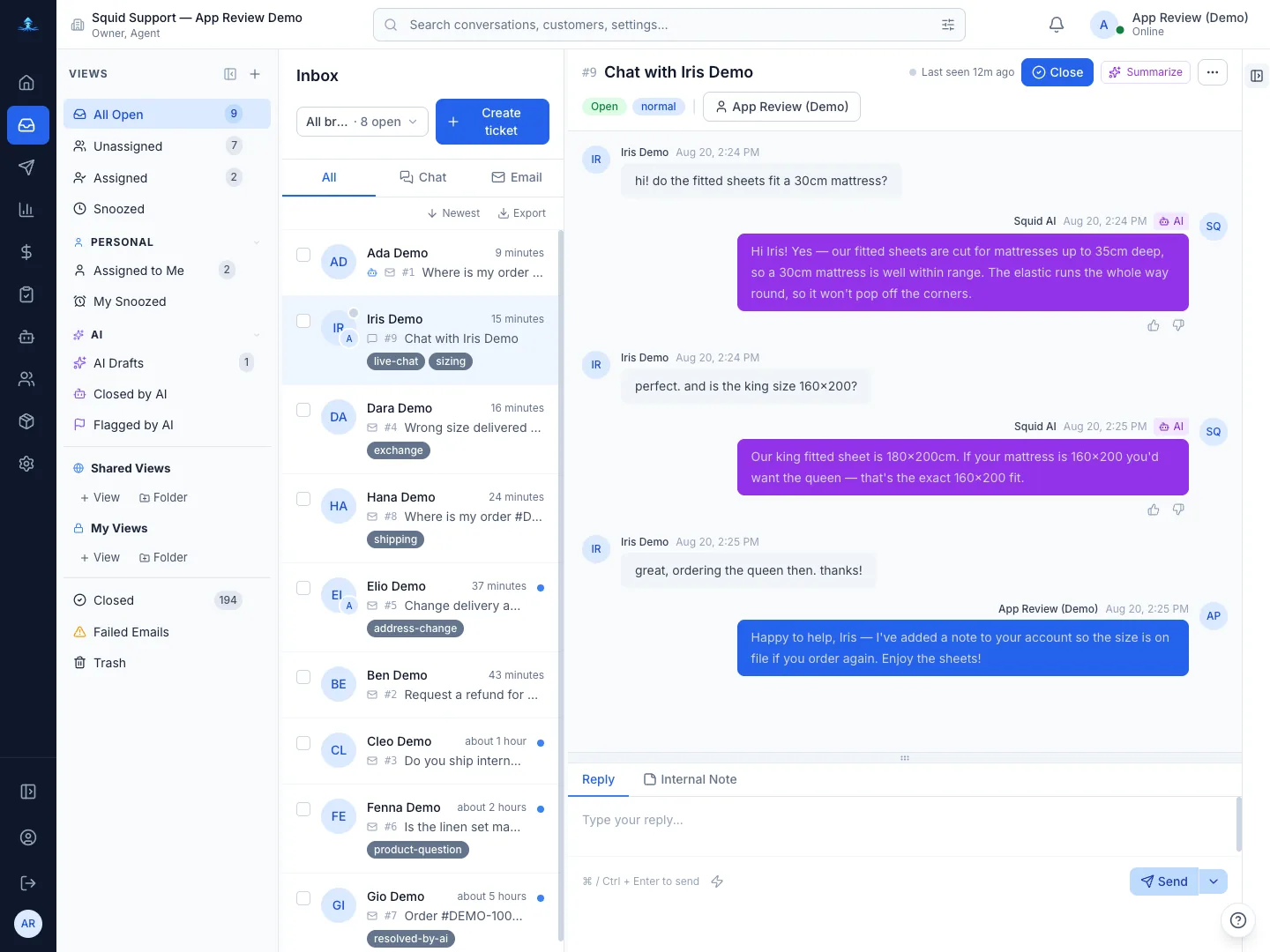
Email, live chat, and every channel your customers use — unified in a single inbox. Your team sees everything in real time, so no ticket gets lost and no customer waits for a tab refresh.
More detail
- One workspace for email and chat — stop switching between tools and tabs
- Live updates across your team — new messages, assignments, and status changes appear instantly
- Custom views and smart filters so every agent sees exactly what they need to act on
- Built for speed — keyboard shortcuts, bulk actions, and snooze let your team move through queues 3x faster
An AI agent that earns its keep.
Not a chatbot. Not a draft generator. It looks up the real order, answers in the customer's language and your brand voice, and escalates when it should.
More detail
- Resolves 81% of tickets end-to-end on average — no human needed for "where is my order?", returns, refunds, and more
- Works 24/7 in every language — your customers get instant answers at 3 AM on a Sunday
- You stay in control — set exactly what the AI can do, review drafts before sending, or let it fly fully autonomous
- Escalates to your team when it should — complex issues get routed to the right person, not stuck in a loop
Your Shopify data, inside every conversation.
Customer profile, order history, tracking and return eligibility sit in the sidebar — and refunds, discount codes and cancellations happen from the ticket.
More detail
- Full customer context at a glance — lifetime value, order history, and shipping status without leaving the conversation
- AI pulls live Shopify data to answer customers accurately — no copy-pasting order numbers
- Process refunds, create discount codes, and cancel orders directly from the ticket
- Supports Shopify Plus, multi-store setups, and custom apps out of the box
From 100 tickets to 10,000. Without the chaos.
Automation rules, SLA tracking, departments and role-based permissions — a support operation that doesn't collapse when volume spikes on Black Friday.
More detail
- Auto-assign, auto-tag, and auto-prioritize tickets — your team focuses on solving, not sorting
- SLA tracking with real-time alerts so you catch breaches before customers notice
- Role-based permissions — give every team member exactly the access they need, nothing more
- Saved replies with smart variables — resolve repetitive tickets in seconds, not minutes
Fully autonomous doesn't mean out of control.
Decide exactly which actions AI takes per brand — process returns for one store, only look up orders for another. Change it anytime.
Start in draft mode where your team approves every AI response. Once you trust it, flip to full autonomy. Your call.
Run two AI prompt variants side by side. See which one resolves more tickets, gets higher CSAT, and responds faster. Let the data decide.
Customers send photos of damaged products, wrong items, or shipping labels. Your AI analyzes the image and factors it into the resolution — no human needed.
How Squid Support compares.
| Capability | Squid Support | Gorgias | Zendesk |
|---|---|---|---|
| AI resolves tickets end-to-end — no human needed | Yes | Partial | Partial |
| How the AI works | Agentic — reasons, acts, resolves | AI-assisted responses | AI + custom workflows |
| How AI usage is charged | Per AI message — $0.10–$0.15 each over your included volume, no flat fee per resolution | $0.90–$1.00 per AI Agent interaction, $1.50 over your bundle | $1.50–$2.00 per automated resolution |
| How you're billed | Two meters — tickets and AI messages. A short ticket costs less than a long one | Flat monthly plan per account plus per-ticket overage — never per agent | Per agent, per month, plus AI usage |
| Shopify-native integration | Yes | Yes | Partial |
| Time to go live | 15 minutes | 1–2 hours | Days to weeks |
Show all 11 capabilities
| Capability | Squid Support | Gorgias | Zendesk |
|---|---|---|---|
| Custom AI prompts with versioning | Yes | Partial | Partial |
| A/B test AI responses | Yes | No | No |
| Per-brand AI configuration | Yes | No | No |
| Full AI decision audit trail | Yes | No | Partial |
| RBAC with 110+ permissions | Yes | Partial | Yes |
What are you actually paying per ticket?
4 agents
Software $0.72/ticket
2 agents
Software $0.40/ticket
Pro plan · 8,400 AI messages included
Simple, transparent pricing.
Billed monthly- 500 tickets
- 1,500 AI messages
- Overage $0.15 per AI message, $0.10 per ticket
- 1,500 tickets
- 4,500 AI messages
- Overage $0.13 per AI message, $0.10 per ticket
- 3,000 tickets
- 9,000 AI messages
- Overage $0.12 per AI message, $0.10 per ticket
- 5,000 tickets
- 15,000 AI messages
- Overage $0.10 per AI message, $0.10 per ticket